
Aetna Better Health - Medicaid
Aetna IncMedical
3.2356.00 Reviews
- Version
- 8.8
- Installs
- 100.00K
- Age Rating
- Everyone
Screenshots
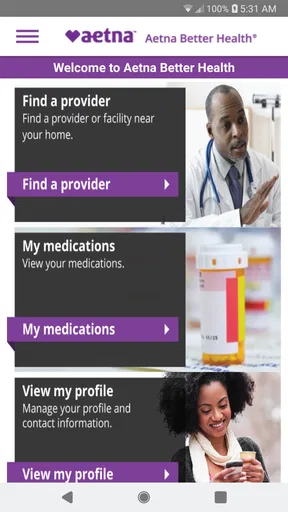
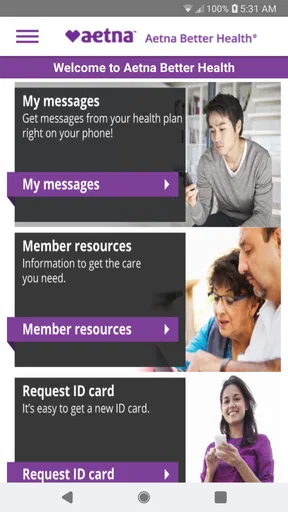
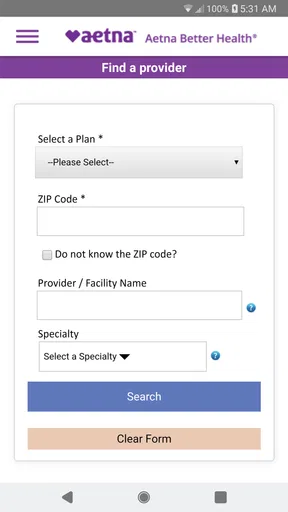
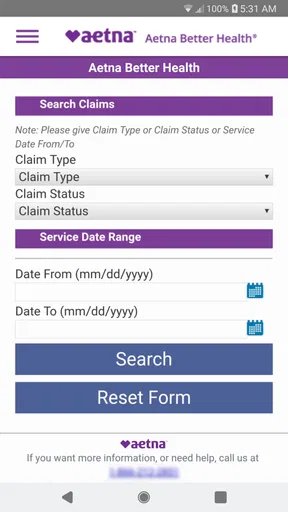
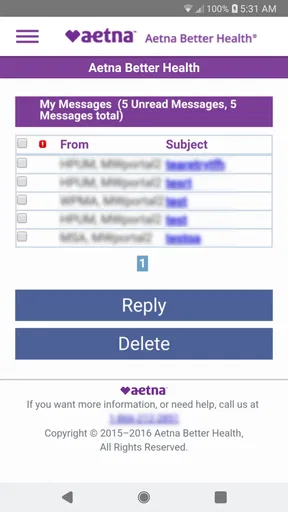
Our Review of Aetna Better Health - Medicaid
 Analysis by Appyee
I approached Aetna Better Health - Medicaid as a practical medical app rather than something designed to replace a doctor, a clinic, or a full health-record system. My overall impression is that it is most useful as a convenient doorway into everyday health-care tasks for people covered by Aetna Better Health. It can make routine account and care-management jobs easier to handle from a phone, but its value depends heavily on whether your coverage is connected to Aetna Better Health and whether the tools you need are among the app’s supported services.
The app is developed by Aetna Inc and is available free of charge for everyone. It has been on the mobile market since February 11, 2015, and the current version is 8.8. That long presence matters because a health-insurance app is something I want to feel established enough for regular use, even though the experience still needs to be judged by clarity and reliability rather than age alone.
What the app is really useful for
At its best, this is a mobile access point for popular health-care tools connected with Aetna Better Health. I would not install it expecting a general wellness tracker, symptom checker, medication reminder, or emergency-care substitute. Its purpose is narrower and more practical: helping members reach information and services related to their Medicaid coverage without having to begin every task through a browser or a phone call.
That distinction is important. Many people think of a medical app as something that records steps, monitors heart rate, or explains symptoms. This one belongs to the Medicaid member-services side of the category. The useful question is not “Will it improve my fitness?” but “Will it save me time when I need to deal with my health plan?” For the right member, that can be a much more valuable benefit.
I found the strongest case for using it in ordinary administrative moments. Imagine needing to check something about your coverage while away from home, preparing for an appointment, or trying to sort out a health-care task when a desktop computer is not available. A phone-based entry point is more convenient than searching through old papers or waiting until you can sit down at a computer. The app’s basic appeal comes from putting plan-related access in a place most people already carry.
There is also a useful psychological advantage to having a dedicated health-plan app. Coverage questions are easy to postpone because they often involve paperwork, phone menus, and unfamiliar terms. A mobile app can make those jobs feel more immediate. I still recommend checking important details carefully, but reducing the number of steps between a question and the relevant plan tool is a meaningful improvement over relying only on printed material.
A realistic day-to-day scenario
Suppose I am an Aetna Better Health member arranging care for a child. I may need to review plan information before contacting a provider, confirm that I am using the correct member service, or find the right place to begin a routine request. In that situation, opening the app first is sensible. It gives me a focused starting point instead of making me navigate a general search engine, guess which page belongs to my plan, or sort through several unrelated health websites.
The same logic applies to an adult managing coverage for a parent or another family member. A mobile shortcut is especially helpful when the task is interrupted by work, travel, or caregiving. I can return to it later rather than keeping a browser tab open or carrying a folder of documents. The app does not remove the need to understand the plan, but it can make the process less scattered.
My practical tip is to use it before an urgent need arises. Open it when you have time, become familiar with the available sections, and make sure you know where the main member tools are located. That small preparation can prevent frustration when you are already dealing with an appointment, a billing question, or a time-sensitive coverage concern. A health-plan app is most helpful when it is already familiar, not when it is being explored during a stressful moment.
Where it compares well with usual alternatives
The usual alternatives are a mobile browser, a phone call, printed plan documents, or a general search for Aetna Better Health information. Each option has a place, but the dedicated app can be more direct for recurring member tasks. A browser is flexible, yet it can require repeated sign-ins and careful checking that you are on the correct plan page. Printed information is useful when offline, but it can become outdated or difficult to search. Calling a representative is better for complicated or personal questions, but it takes more time and may require waiting.
I see the app as a complement rather than a replacement for those options. Its advantage is convenience and focus. A phone representative remains the better route when a situation needs explanation, judgment, or a detailed review of an individual case. Printed documents may be preferable when you need to compare information slowly or share it with someone who does not use smartphones. The browser can be more comfortable for long forms or extended reading.
That trade-off is easy to overlook. A mobile interface is convenient for short interactions, but a small screen is not automatically the best place to understand complex coverage language. I would use the app to locate the right resource and handle straightforward steps, then switch to a larger screen or contact support when the decision has financial or medical consequences.
What I liked about the mobile approach
The clearest strength is focus. Because this is built around Aetna Better Health rather than general health content, it is less likely to send me through unrelated wellness features when I am trying to reach a plan service. That narrow purpose can make the app feel more relevant than a broad health platform that mixes exercise, nutrition, symptom information, and insurance links in one place.
I also appreciate that the app is free. There is no additional purchase standing between an eligible member and the basic mobile experience. The Everyone age rating makes it broadly approachable from an audience standpoint, including households where more than one adult may help manage health-care matters. That does not mean every person will find the interface equally easy, but it avoids making the app feel aimed only at a particular age group.
Its scale also suggests that it is not an obscure experiment. The app has passed 100K+ installs, while its average rating is 3.2 from around 689 ratings and 356 reviews. I read that combination as a sign of a useful but uneven experience: enough people find a reason to keep it available, yet the rating does not support calling it exceptionally polished. For me, that means the app is worth trying if I am an eligible member, but I would keep another contact route available for important issues.
The main weakness is dependence on the coverage relationship
The biggest limitation is also built into the app’s purpose: it is not broadly useful to everyone. If my Medicaid coverage is not through Aetna Better Health, the central reason to use it disappears. Even if I am interested in general medical information, this is not the kind of app I would choose as a universal health companion. It is tied to a particular plan relationship, and that makes eligibility the first question to settle before spending time learning the app.
That dependence can create confusion for people whose coverage has changed. Medicaid members may move between plans, regions, or coverage arrangements, and a previously useful member app may no longer be the right place for current information. I would therefore verify that the plan name shown in my documents matches Aetna Better Health before relying on the app for a care-related task. If the plan relationship is uncertain, calling the number on current coverage paperwork is safer than assuming the app has the answer.
Another limitation is the difference between access and resolution. An app can help me reach a tool, but it may not settle a complicated authorization question, explain why a claim was handled a certain way, or interpret a clinical decision. Those situations may require a representative or a health professional. I would avoid treating the app as proof that a service is covered merely because I can find a related section inside it. Coverage decisions can depend on details, and serious questions deserve direct confirmation.
There is also a human-factor weakness. People who are not comfortable with account logins, mobile navigation, or reading health-plan language may find a dedicated app no easier than a website. In fact, switching between screens on a phone can make a complicated task feel more fragmented. For older adults, caregivers, or members with accessibility needs, a phone conversation or in-person assistance may be more effective. The app should expand choice, not become the only expected route to care information.
How I would use it without creating extra risk
I would begin with low-risk tasks: exploring the main areas, locating member tools, and learning the path to support. I would not wait until I was in a clinic waiting room to discover how the app is organized. I would also keep current plan documents nearby when checking important information, because matching what appears in the app with official coverage material is a sensible safeguard.
For a routine appointment, my workflow would be simple. First, I would open the app to review the plan-related information relevant to the visit. Next, I would write down any question that remains unclear instead of relying on memory. Finally, I would contact the plan or provider directly when the answer affects eligibility, authorization, or payment. This approach uses the app for speed while reserving human help for interpretation.
A second useful habit is separating plan questions from medical questions. If I want to know whether a service is available under my coverage, the app may be a reasonable starting point. If I want to know whether a symptom is dangerous or whether I should change treatment, I would use a clinician or an appropriate urgent-care service instead. That boundary is essential because the word “medical” can make people assume an app offers clinical guidance when its real role is member access.
I would also avoid using a search result as a substitute for confirming the app’s identity. Since health information is sensitive, I would choose the official Aetna Better Health application associated with Aetna Inc and pay attention to the developer name before signing in. This is a practical step whenever several similarly named health apps appear in an app store. It helps prevent entering personal information into an unrelated application.
Who will benefit most
I think the best audience is an Aetna Better Health Medicaid member who handles routine coverage tasks from a smartphone and wants a more convenient alternative to repeatedly searching the web. It is also a reasonable choice for caregivers who help a family member organize health-plan information, provided they understand whose account they are managing and do not confuse plan access with medical advice.
The app may be especially worthwhile for someone who often moves between home, work, school, and appointments. In those circumstances, a phone-based tool is easier to reach than a binder or desktop computer. It can also help a new member become familiar with the plan’s digital entry point instead of discovering it only after a problem appears.
I would be more cautious recommending it to someone who rarely uses mobile apps, has limited internet access, or prefers speaking with a person for every health-plan question. That person may gain more from keeping plan paperwork organized and using member services by phone. Likewise, anyone looking for exercise tracking, nutrition coaching, medication reminders, or broad symptom education should choose a different category of app. This one is not intended to be an all-purpose personal health dashboard.
People with complex cases should treat it as one tool in a larger process. If a treatment decision, authorization, or coverage dispute is involved, the convenience of an app should not encourage rushed conclusions. Use it to find the appropriate starting point, collect the relevant details, and then ask for clarification through the official support channel when needed.
My final recommendation
After looking at its role, strengths, and limitations, I see Aetna Better Health - Medicaid as a practical companion for eligible members, not a complete medical solution. Its strongest quality is straightforward access to plan-related health-care tools from a phone. Its weakest point is that convenience cannot overcome the need for accurate coverage details, human assistance, or clinical advice in more complicated situations.
The 8.8 release shows that the app remains an active part of the mobile experience, while the moderate 3.2 average suggests I should approach it with realistic expectations rather than assuming every member will find it frictionless. I would install it if my Medicaid plan is Aetna Better Health, explore it before I need it, and keep the official phone and web alternatives available. The free cost makes trying it low-risk, but the real benefit comes only when its member tools match the task I need to complete.
My recommendation is therefore specific: eligible Aetna Better Health members should give it a try for routine plan access and everyday organization. Members of other plans, people seeking clinical guidance, and users who need extensive desktop-style forms should look elsewhere or use a different support route. Use it as a convenient front door to your health plan, not as the final authority on your care.
Verdict
Strengths of Aetna Better Health - Medicaid
- Secure member access for checking benefits and coverage details.
- Digital ID card makes provider visits more convenient.
- Helps locate in-network doctors, clinics, and pharmacies.
- Useful tools for viewing claims and tracking healthcare activity.
- Can simplify contacting member services from a mobile device.
Limitations of Aetna Better Health - Medicaid
- Features may vary depending on your state and Medicaid plan.
- Some users may need to register before accessing account information.
- Provider directories may occasionally contain outdated details.
- App usefulness is limited for non-Aetna Better Health members.
- Certain tasks may redirect users to external websites or phone support.
Other Releases by Aetna Inc
View All
Aetna Health
Medical4.3
Similar Picks in This Category
View All
WebMD: Symptom Checker
WebMD, LLC4.1

Microphone Amplifier
DOSA Apps4.2

Anatomy Learning - 3D Anatomy
3D Medical OU4.5

Period Tracker and Calendar
SimpleInnovation4.9

GoodRx: Prescription Coupons
GoodRx4.8

CVS Health
CVS Pharmacy4.5
Frequently Asked Questions
What is Aetna Better Health - Medicaid, and who can use it?
Aetna Better Health - Medicaid is a mobile app designed for members enrolled in participating Aetna Medicaid health plans. It can help users access plan information, view benefits, find doctors and pharmacies, check claims, and manage certain health-related tasks from a phone. Availability and features may differ by state and plan, so eligibility should be confirmed through your Aetna member information.
What can I do with the Aetna Better Health - Medicaid app?
After signing in, members may be able to view their digital member ID card, review benefits, search for in-network doctors or facilities, locate pharmacies, check claims and authorizations, and access contact information for member services. Some plans may also provide health resources, care-management tools, or appointment support. The exact options depend on your state’s Medicaid program and your specific Aetna plan.
Do I need an Aetna Better Health member account to use the app?
Most personalized features require you to register or sign in with an Aetna Better Health member account. You will generally need information such as your member ID and personal details to verify your identity. If you have forgotten your username or password, use the recovery options in the app or contact Member Services. New members may need to wait until their enrollment is active.
Can I use the app to find doctors and check whether they accept my plan?
The app may include a provider directory that helps you search for doctors, specialists, hospitals, pharmacies, and other healthcare professionals in your network. Search results can depend on your location, plan, and selected provider type. Because provider information can change, it is wise to confirm participation, availability, and appointment details directly with the provider before receiving care.
Is the Aetna Better Health - Medicaid app free and safe to use?
The app is generally available at no additional charge to eligible Aetna Better Health members, although normal mobile data charges from your carrier may apply. It is intended to protect account and health-plan information through sign-in and security measures. For safety, download it only from the official Google Play Store or Apple App Store, keep your device updated, and avoid sharing your login details.
